Windows 11 Search Can Launch Android Phone Apps Through Phone Link
Search becomes a bridge to phone actions
Windows 11’s taskbar Search is becoming a shortcut to actions on an Android phone. In its latest Insider Experimental Preview Build, version 26340.9843, Microsoft has added app launching alongside existing calls, texts and phone controls. The change gives Search a role beyond finding files, settings and web results: it can now help send a request from the PC to a connected handset.
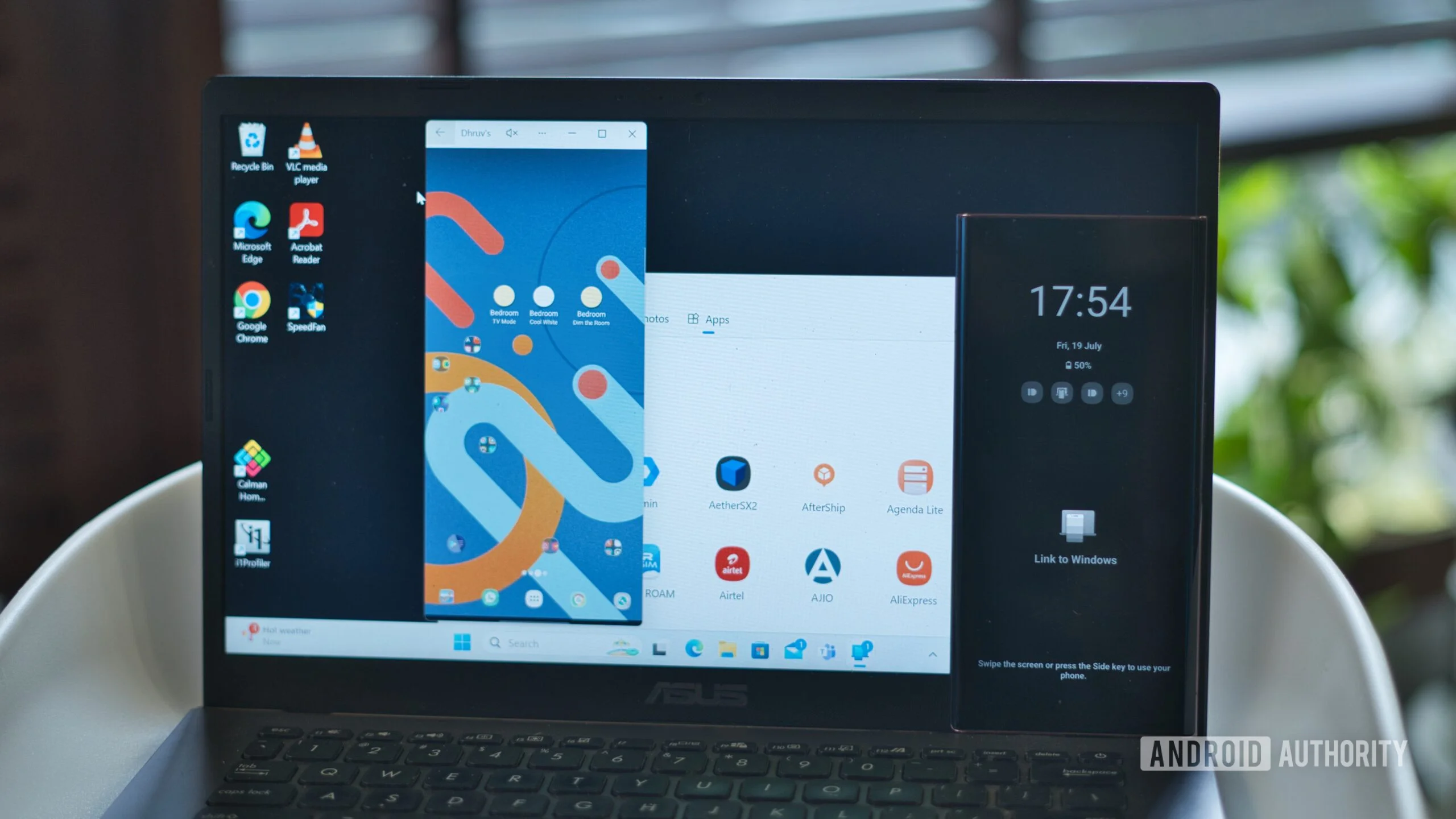
Search for a phone app and Windows opens it on the handset, then mirrors it on the PC through Phone Link. The app still runs on the phone; Windows provides a way to reach and interact with it from the computer. That distinction matters. Phone Link isn’t turning Android apps into native Windows programs, and the experience depends on the phone connection and Microsoft’s integration between the two devices.
The feature works with select Samsung, HONOR, OPPO, ASUS, vivo, Xiaomi, iQOO and Realme phones. That list establishes meaningful Android support, but it doesn’t mean every Android handset will work. Device compatibility is a practical limit for a feature whose appeal depends on being able to use it with the phone already in your pocket.
Microsoft’s release notes also describe queries such as “dnd phone,” which surface an option to turn on Do Not Disturb. That’s a different kind of shortcut from launching an app: Search can identify an action and present a control, rather than merely opening a screen where the user must find the setting. The available examples suggest a broader design direction, though they don’t establish how many phone controls Search will eventually support.
What the PC can do, and what still happens on the handset
For a user, the appeal is less about adding another way to open an app than about reducing the small steps between noticing a task and doing it. A person working at a PC can search for a phone app without picking up the handset, then see that app mirrored through Phone Link. For a quick check or a short interaction, keeping attention on one screen may feel simpler than switching devices.
There are limits to that convenience. Because the app opens on the phone and is mirrored on the PC, the handset remains part of the process. The feature doesn’t, on the information Microsoft has provided here, imply that Android apps are installed on Windows or run independently of a connected phone. That’s a useful distinction for anyone expecting a desktop app experience rather than remote access to a phone.
The same distinction shapes how well this works in practice. A shortcut can make an existing capability easier to reach, but it can’t remove the underlying requirements of the connection or make an unsupported device compatible. If you’re working in this space, the more telling question isn’t simply whether Search can launch an app; it’s whether the handoff is dependable enough that people stop reaching for their phones by habit.
And this is the part most people overlook: adding actions to Search also changes what users may expect Search to understand. A query such as “dnd phone” points toward natural, task-oriented requests, but one example doesn’t show how broadly the system interprets everyday phrasing. The first impression will depend on whether people can guess what to type and get a useful result without learning a special vocabulary.
A longer effort to connect Windows and Android
This update extends Microsoft’s efforts to connect Windows and Android, following additions such as a Mobile devices tile and improved clipboard history syncing. Those features address different kinds of friction. A device tile makes phone-related access more visible, while clipboard syncing can help move copied material between devices; app launching and controls bring those connections into the moment when someone wants to act.
Taken together, these additions point to a familiar product strategy: make the computer a control point for activities that still happen on a phone. That approach can be useful because many people work across both devices, but each extra connection also needs to feel predictable. If users aren’t sure which device will respond, or whether an action will open locally or on the handset, a shortcut can add confusion instead of removing it.
Phone Link is central to that arrangement. In this feature, it supplies the bridge that lets Windows display a phone app on the PC. The taskbar Search box supplies the starting point. That division gives Microsoft a way to make phone functions feel closer to Windows without claiming that the phone and PC have become one system. It also means the value of the Search addition is tied to how well the existing phone connection works.
Why the rollout details matter
The feature is in an Insider Experimental Preview Build, which places it in a preview channel rather than establishing that it’s available to every Windows 11 user. Preview software gives Microsoft a setting in which it can introduce features and gather feedback, but the announcement alone doesn’t tell us when this capability will reach a wider release or whether its current form will change. Those are open questions, not details that can be inferred from the build number.
Phone compatibility is another qualifier. Microsoft names supported brands, but the description says “select” phones, leaving the precise reach dependent on individual devices and the company’s support criteria. A brand appearing on the list shouldn’t be read as a guarantee that every model from that manufacturer is included. For users, checking compatibility will be part of deciding whether this is a practical feature or just an appealing preview.
Android support is available now; iPhone support is expected early next year, according to Microsoft. The wording signals an intention, while leaving the timing broad. It also leaves unanswered how the iPhone experience will compare with the Android version. Phone integrations can differ by device and platform, so the announced plan doesn’t establish that the same app launching and control options will arrive on both.
The significance is in the small handoffs
This is more significant than it looks if the everyday handoff works well. A search box that can launch a phone app or surface a setting turns Windows into a more active companion to Android, rather than a place that merely displays notifications or passes information between devices. The gain may be modest each time, but repeated small actions are where cross-device features either become habits or disappear from view.
The numbers here are underwhelming in the sense that Microsoft has described a set of capabilities, not a dramatic change to how apps run. Still, the direction is clear: Search is being used as an entry point for tasks that span the PC and phone. What this means for you depends on your devices and routines. If you already use Phone Link and own a supported handset, the feature could make a few common actions easier to start from your desk.
That said, a useful preview feature isn’t the same as a settled product. The test will be whether users can find the right action quickly, whether their phones are supported, and whether the PC-to-phone connection behaves consistently. A shortcut only earns a place in someone’s routine when it saves effort often enough to justify remembering that it exists. For now, Microsoft has shown a plausible next step for Phone Link, with broader availability and the eventual iPhone experience still ahead.
What comes next
Microsoft’s stated next step is iPhone support, expected early next year. That would extend the idea beyond Android, though the available information doesn’t specify which iPhone actions will be supported or how they’ll work. Until those details arrive, the clearest description is narrower: Windows Search can start selected actions on certain Android phones, with Phone Link providing the PC view.
A practical measure of success will be whether people use these shortcuts without having to think about the plumbing behind them. Search, app launching, phone controls and mirroring form a chain; if any link feels slow or unclear, users may simply pick up the phone. A small feature, then. Potentially useful, but its value will be settled by routine use rather than by the breadth of the announcement.
Search becomes a bridge to phone actions
This update extends Microsoft’s efforts to connect Windows and Android, following additions such as a Mobile devices tile and improved clipboard history syncing. The practical shift is that users can start common phone tasks from the PC’s Search box, while apps still run on the phone itself.
For people who already use Phone Link, this makes the PC a more direct control point for their handset. The next step is iPhone support, which Microsoft says is planned for early next year.